What I learned while building a browser agent

I wanted to learn more about building agents, so I started with a browser agent. Browsing the web is an increasingly popular capability we expect out of agents today. How does it work?
You'll see my attempt below, along with some thoughts at the end. I've linked my commits to a public browser-agent repo if you want to follow along. I've also sprinkled some links throughout on things I learned about along the way but didn't immediately apply to this small project.
Start simple
Just pull up a webpage, and answer questions about the contents. You can consider this to be the "hello world" of browser agents, I guess. I did some research on how an agent is even architected. There are a bunch of solutions out there, and every AI shop has their own kit:
I'm eyeing some of these in the future for more complex use cases. I decided to go vanilla for now, to understand what happens under the hood. Really it's 3 components:
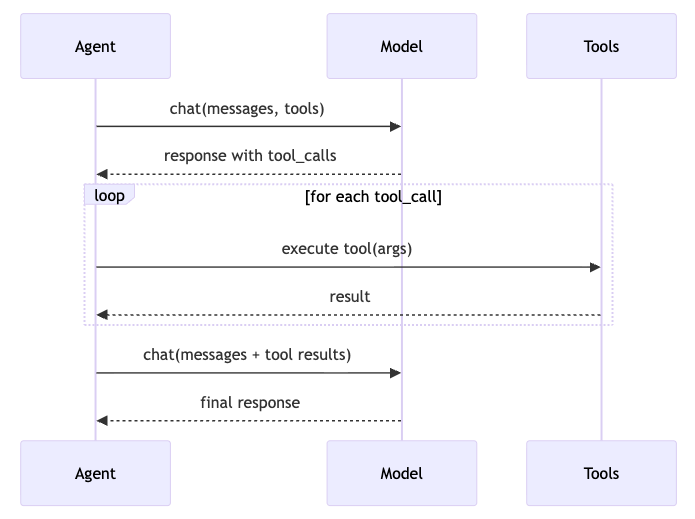
- An
Agentfile to orchestrate:Model: interaction with the llm (in the form of chat completions)Tools: functions, scripts, etc. that we give the model access to call
What models are best for browser use?
There are a TON of benchmarks out there. Just some I came across are:
You'll notice that some of these benchmarks are published by the same people selling the the products they are evaluating (see: BrowserUse). Evaluations in general seem like the wild west these days. If you've got pointers on how to find/identify well-run eval boards, please point me in the right direction!
I landed on using qwen/qwen3-32b because it was pretty cheap on OpenRouter ($0.08/M tokens), and I was really looking to fail often, and fast so I could learn. If I was building towards a real use-case, I'd look specifically at the skillsets needed (in this case, reading html, navigating the web, and tool calling), and pick a model that excelled in those skills. I switched between qwen, and deepseek/deepseek-v3.2 ($0.26/M tokens)as I played around.
OpenRouter happens to provide a unified api that gives access to any model through just one endpoint, so it was as easy as implementing that.
How do we arm this model with browser capability?
There's a couple of options here. The easiest way to get off the ground is Playwright. This library can do simple web browsing. There are alternatives like Vercel's Agent Browser, or Puppeteer to consider.
We add some simple functions using the playwright library to:
- navigate to a URL
- get page title
- get page content
Combining the two
As a basic use-case, I wanted this browser agent to go to Monkey D. Luffy's wikipedia page, and tell me what his signature attack is. From the sequence diagram above, you can see that the flow is pretty simple. Agent receives a URL, and a prompt. The first Model call decides what tool it needs to call to fulfill the prompt's ask (get_page_content on the URL). The Tool is called, and content is added to the context window. The Model is called again with the content, and it answers, synthesizing the information.
Here I noticed a couple of things:
- When there are multiple tool calls happening, the page itself isn't persisted across calls. I needed a way to preserve the state of the browsing session between tool calls.
- Introduced browser, and page caches
- I also learned about stateful vs stateless browser automation, and when one was useful over the other. Good to know for the future.
- During unhappy paths on tool calls (page inaccessible, selector not loading, bot protection, etc.), there's no easy way for the
Modelto move forward. Sometimes it ends up in a ridiculous loop repeating the same call over and over again.- Introduce try/catches inside the tool functions
- Bubbled errors up to Agent, and introduced a failure system prompt
- I also learned about SHIELDA, which introduces structure to handling exceptions in agentic workflows. I didn't find any implementations of this, but the paper describes a very thorough approach to handling unhappy paths during agent runs.
- The frameworks we ran into above have different ways to handle these unhappy paths as well (retries, waits, human-in-the-loop, etc.)
python3 agent.py https://en.wikipedia.org/wiki/Monkey_D._Luffy "what is luffy's signature attack?"

19:23:25.643 [chat] start  model=deepseek/deepseek-v3.2 msgs=2
19:23:29.185 [chat] done   3.54s
19:23:29.185 [tool] navigate  url=https://en.wikipedia.org/wiki/Monkey_D._Luffy
19:23:30.494 [tool] navigate  done 1.31s
19:23:30.494 [chat] start  model=deepseek/deepseek-v3.2 msgs=4
19:23:34.074 [chat] done   3.58s
19:23:34.074 [tool] get_page_content
19:23:34.123 [tool] get_page_content  done 0.05s
19:23:34.123 [chat] start  model=deepseek/deepseek-v3.2 msgs=6
19:23:45.419 [chat] done   11.30s

Perfect! I found the answer in the page content.
**Answer:** Luffy's signature attack is the **Gum-Gum Pistol**.
Surf the Web
Ok so we can read a page, and answer questions. Now what? A good browser agent can interact with the page, react to changes happening on it, and even move around between pages.
More tools
I added click, type, key, and wait into the toolset. Let's test out how it can interact with a webpage.
Example: BetaNYC has a handy website that allows you to figure out what all the overlapping government districts are to a particular address (https://boundaries.beta.nyc/ ). Let's have our browser agent list out all the districts associated with an address.
python3 agent.py https://boundaries.beta.nyc/ "Find and list all the districts associated with 476 5 AVENUE, Manhattan, 10018"

19:31:11.854 [chat] start  model=deepseek/deepseek-v3.2 msgs=2
19:31:15.396 [chat] done   3.54s
19:31:15.396 [tool] navigate  url=https://boundaries.beta.nyc/
19:31:16.102 [tool] navigate  done 0.71s
...
...
...
19:31:44.600 [tool] get_page_content
19:31:44.608 [tool] get_page_content  done 0.01s
19:31:44.608 [chat] start  model=deepseek/deepseek-v3.2 msgs=16
19:31:58.047 [chat] done   13.44s

Great! I can see the search results. The page shows all the districts associated with 476 5 AVENUE, Manhattan, 10018. Let me extract all the districts systematically:

Based on the page content, here are all the districts associated with 476 5 AVENUE, Manhattan, 10018:
1. **Community District**: Manhattan 5
2. **City Council District**: 4
3. **State Assembly District**: 75
4. **State Senate District**: 28
5. **Congressional District**: 12
6. **School District**: 2
7. **Police Precinct**: 14
8. **Police Sector**: 14E
9. **Sanitation District**: MN05
10. **Fire Battalion**: 8
11. **Health Center District**: 15
12. **UHF 42 Neighborhood**: Chelsea - Clinton
13. **Neighborhood Tabulation Area**: Midtown-Times Square
14. **Municipal Court District**: Manhattan 9
15. **Business Improvement District**: Bryant Park Corporation
16. **Public Use Microdata Area**: 4165
17. **Citywide District Tabulation Area**: MN05
18. **Zipcode**: 10036
19. **Election District**: 75 014
Complex navigation (6 degrees of wikipedia)
Let's play 6 degrees of wikipedia! We have to get from one wiki page, to another only by clicking links on the page. In order to achieve this, I changed three things:
- Added a loop
- Instead of
Model->Tool->Model (summary), I introduced a 20 iteration loop of "Tool->Model", like the sequence diagram above - If a tool failed, I tracked it with a
Consecutive counter. If more than 3 tool calls failed in a row (arbitrary to start. This could be tuned later), I aborted the loop, and indicated failure
- Instead of
Extract linkscapability- Pull all
hrefelements from the page, or a particular region of the page and return a list of them for the Model to use in the next iteration - This helped navigation, giving the llm specific destinations to go to. I'd noticed it hallucinating some wikipedia URLs sometimes when i was giving it tasks, and this helped keep it honest.
- Pull all
Go backcapability- Like me sometimes, the
Modelwould make a mistake, and go down the wrong path during 6 Degrees. Truly I just wanted to see if it would ever use this as an option if it was available. - Turns out it was a good idea. I found that smaller models tended to go in the wrong direction from time-to-time when playing the game. This helped them come back on path.
- Like me sometimes, the
Optimizing
When I tasked it to navigate to through multiple pages on a task, the get_page_content tool bloated the context window completely. The amount of HTML, content, and general information in the context window was getting out of hand. I learned a little about context management. It became important to manage the size of the context window, and be careful about what went into it. I learned a little about:
- KV Cache, Masking, Recitation, and a bunch of other things
- A comparison of performance between Masking and Summarization
I tried truncating each page before it went into the context. I found that the model wasn't able to pick up any clues from the page as a result. The first 2000 chars just wasn't enough for it to find useful. I moved to a sliding masking window. I would keep everything in the context for the last 5 iterations of the loop. For everything else, I would mask the result as:
extract_links
[result masked: extracted links to Google, Wikipedia, GitHub]

get_page_content
[result truncated: <first 2000 chars>...]

get_page_html
[result masked: HTML snapshot]

take_screenshot
[result masked: screenshot]

click, type_text, etc.
[result masked: action completed]

 anything else
[result masked]
This improved the experience immensely. The agent was able to navigate through wikipedia links, and find its way to the destination easily. It never achieved the fastest path between the two pages, but I didn't expect it to.
Observations
Context management is the main problem for browser agents (and I suspect most other use-cases). You must monitor exactly what is in a model's context window. This helps optimize a specialized agent's course to solve problems as its running. Context observability and agent observability can help you figure out inefficiences in the agents path (bloated page data, large chat history, etc.). This is now on my "next to learn" list.
My system prompt was pretty vague:
- You are a browser agent. You have access to browser tools to navigate and interact with websites.
- You will be given a URL to start at and a goal. Navigate step by step, calling tools as needed.
- When you have gathered enough information to answer the goal, stop calling tools and give your final answer.
- Be systematic: navigate, observe the page (use extract_links to find links, get_page_content for text, and go_back if you reach a dead end), interact with inputs, wait for results, read the output.
What would happen if we got more specific? In the boundaries example, I changed the prompt to alert it about an auto-complete input field at the top of the page. It performed WAY better, and found its way to the right address on the first try even with smaller models. The more specialized an agent can be, the better.
On that same note, we had the same system prompt, and chat history run the entire option. What, instead if we'd broken it down into a "Web Navigator" agent, and a "Web Analyzer" agent. One's job would be to move and interact with webpages, and the other's job would be to analyze, and figure out what to do next. See (subagents, and handoffs)
Finally tool use is so important in these loops. Really what we need out of an agent is the ability to pick the right tool at the right time. Even if we're able to manage context efficiently, it still needs to take the right action.
I can find myself getting away with things like agent orchestration, controlling model output more closely (see BAML, etc.). Now I've got even more things to learn about.
